League Settings
Configure your league's appearance and functionality
13 settings still to complete
Share this special link so your league appears with the correct name, logo, and description on WhatsApp, Facebook, and other social media.
✅ When shared, social media will show your league's logo and name. Clicking the link takes users directly to your league page.
An internal reference, not your web address. We generate your league's web address from it — see “Your league's web address” below. There is nothing to change here.
bristol.ttleagueapp.comEvery league gets bristol.ttleagueapp.com automatically, so you do not need to do anything. This is your league's web address.
Standard address (always works): ttleagueapp.com?slug=bristol-league
Need a different address? Ask us and we will arrange it — you do not need to change anything yourself.
Show a "we're working on the site" notice to your visitors while your league site is genuinely offline.
Show the maintenance notice
Off by default. While it is off, your site runs normally and the maintenance page simply sends anyone who follows an old link to your home page. Switch it on only while your site is really down.
Off — normal service. Nothing is hidden from your visitors.
Where you land after signing in. This only affects admins on a desktop screen — phone admins keep the Mobile Admin overview.
Admin Home once the league has fixtures and players — otherwise the setup wizard.

Your logo will appear on match cards, headers, and throughout your league website
This image appears as the background on your homepage header
Compact (the default) keeps recent results, notices and news higher up the home page.
Shown as a wide photo above the venue details on your public Contact & Venue page
Shown as a Venue Information block on your public Contact & Venue page
These contacts appear in the league website footer only when "Show committee contact details publicly" is enabled below.
When off (default), names, emails and phone numbers are hidden from the public website footer, contact and about pages. Toggle on to display them.
Clubs can register new teams for the league season. This is separate from championship entries, which are opened on the championship itself.
These details are automatically included in confirmation emails when a registration fee is due.
Accept online payments for registrations and tournament entries directly through your league.
Collect practice-night and social-night fees by card. Players scan a QR code at the table, type their name and pay in seconds — the who-paid register builds itself, so there's no bank-statement matching afterwards.
Enable session payments
Off by default. Turning it on adds the Session Payments tools to your admin menu and opens your public pay page.
Sell unlimited ad placements on your website and keep 100% of the revenue. A flat £5/month add-on on top of your subscription.
Switch on the advertising management tools — sell unlimited ad placements on your website and keep 100% of the revenue. A flat £5/month is added to your subscription. You keep everything your sponsors pay — no revenue share.
How many reserve appearances a player may make before the committee reassigns them to the team they have been playing for. The Reserves page shows every player's count against this number and flags who is due for reassignment. Nothing is ever reassigned automatically.
Amber one short of 4, red at 4 with "reassignment due".
A step-up is playing for a team in a higher division; play-across is another team in the same division. Most leagues restrict step-ups and allow play-across freely.
This one setting decides the league table everywhere — live standings, the nightly results sync and a full stats rebuild.
Match Format Preset
Sets the default player rotation sequence used when entering match card scores. Divisions can override this with their own custom preset.
Play Order
The order games are played in. This drives the printed match card, how a scanned scorecard maps onto the result, and how the result view reads back — so what your captains play is what the site shows.
Order in force
Your card has not been analysed yet, so the standard rotation is being used. Upload a photo of your blank card in the Match Cards section to capture your real order.
Check past results against this orderMatch Format
How many individual matches in a fixture (e.g., 5 singles + 1 doubles)
Points needed to win a set (e.g., 11 for table tennis)
Enable doubles matches in fixtures
⚠️ Important: Stats Recalculation Required
If you change the scoring system, you MUST go to Recalculate Stats page to rebuild all team standings and player statistics with the new scoring rules.
The card marked DEFAULT is the one that prints on fixture match cards and is used by the AI scorecard scanner as the layout reference. Tag a card handicap so handicap cups can auto-select it. Only one template can be the default at a time.
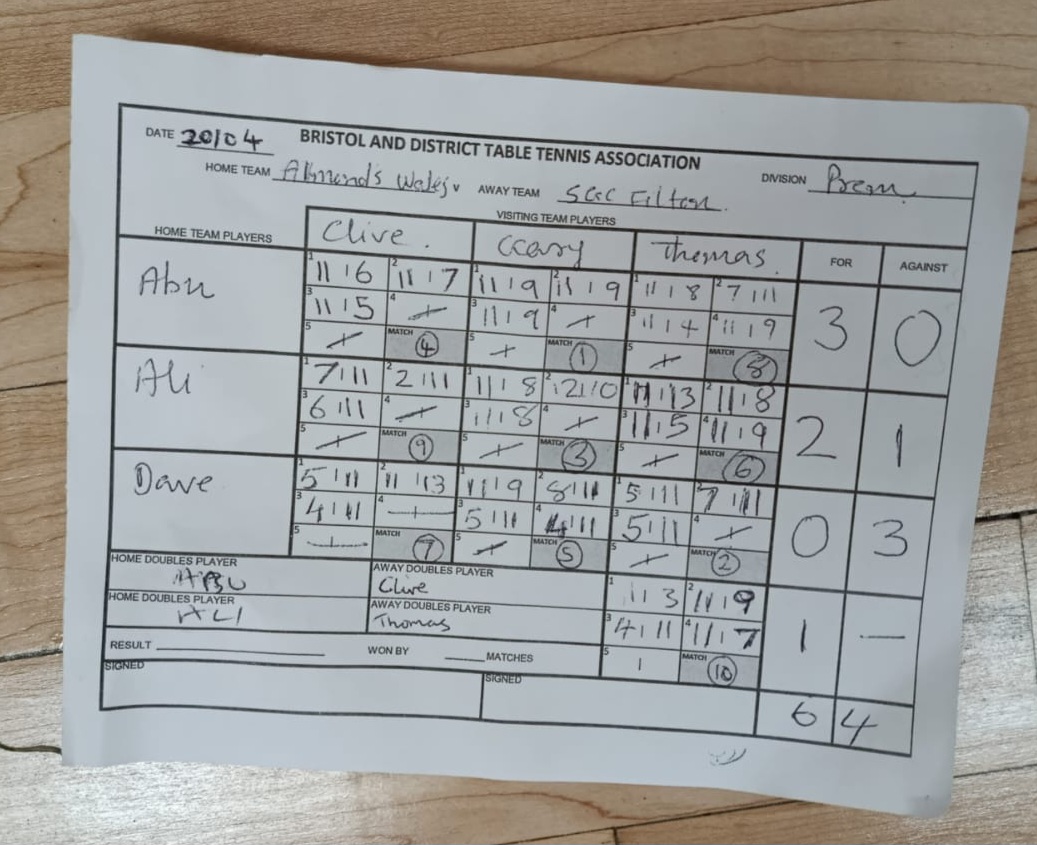
Bristol & District Match Card (Official 3-a-side Matrix)
AI-analysed from photo · 3 players/team · 5 sets/game · doubles · dynamic order · saved 9/17/2026
Hand over this league to its real webmaster. They'll receive an email with a link to accept and get admin access.
No invites sent yet.